Coach Bo: Frequently Asked Questions
 Updated
by
Amy Thomas
Updated
by
Amy Thomas
Coach Bo is Develop's AI-powered coaching bot, available 24/7 to provide workplace guidance and support to any team member, offering tailored advice, constructive feedback and actionable strategies to help users navigate their workplace more effectively.
Coach Bo also powers Weekly Manager Check-ins, a fast, AI-powered conversation that takes just 2–3 minutes each week. Team members respond to a few simple questions about their work, progress, and challenges. Coach Bo transforms that input into actionable insights for managers and leadership.
General
What does Coach Bo do?
In general, Coach Bo’s advice is:
- Compliant with ethics and AI regulations
- Objective, drawing on research and science
- Actionable for workplace improvements
- Confidential and secure
- Human-centric and empathetic
- Based on best practices from a vast knowledge base
- Oriented toward effective solutions.
What information does Coach Bo draw on?
Can we rely on Coach Bo for accurate and relevant advice?
How does Coach Bo adhere to regulations like the EU AI Act?
Coach Bo chats

How do I access Coach Bo?
Why should I chat to Coach Bo?
Learn how to leverage Coach Bo for your individual growth.
Is the advice from Coach Bo confidential?
Note: information provided during Weekly Manager Check-ins will be analyzed and insights shared with managers and leadership within the team member's reporting structure.
Does Coach Bo remember previous conversations?
What kind of advice won't Coach Bo give?
How does Coach Bo handle conflict resolution advice?
Can Coach Bo replace human HR professionals or legal advisors?
What is Coach Bo's approach to coaching?
Coach Bo Weekly Check-Ins
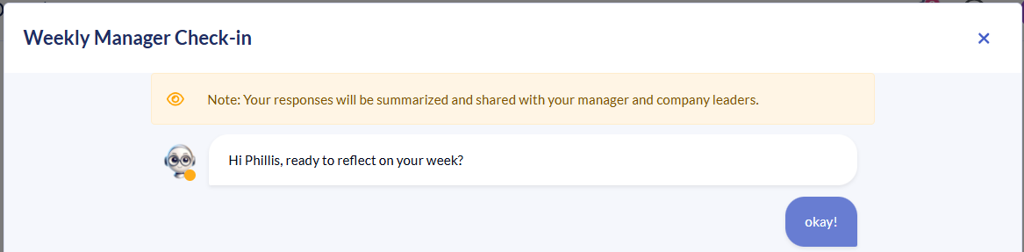
What is the Weekly Manager Check-ins and how is it different from a normal Coach Bo chat?
A Coach Bo Chat is an informal conversation you can have with Coach Bo anytime you want. You can discuss anything work-related, get advice, or reflect on challenges.
The Weekly Manager Check-ins is a more structured, recurring appointment that happens at the same time each week. It helps build a habit of regular reflection and development.
Both serve the same purpose of supporting your growth, but the Weekly Manager Check-ins adds consistency through scheduling. Coach Bo reports insights from your Weekly Manager Check-ins conversations to your managers.
How do I complete the Weekly Manager Check-ins with Coach Bo?
Each week you will receive an email from Coach Bo to check in about your week. Click Chat with Coach Bo to begin the conversation.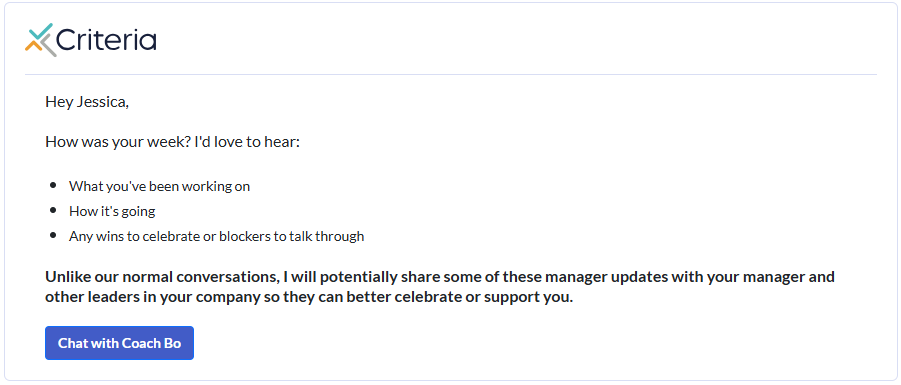
Coach Bo will guide the conversation with a series of questions about what you have been working on, any wins you have had or problems you experienced.
At the end of the conversation, simply close the conversation window.
Can I view my Weekly Manager Check-ins History?
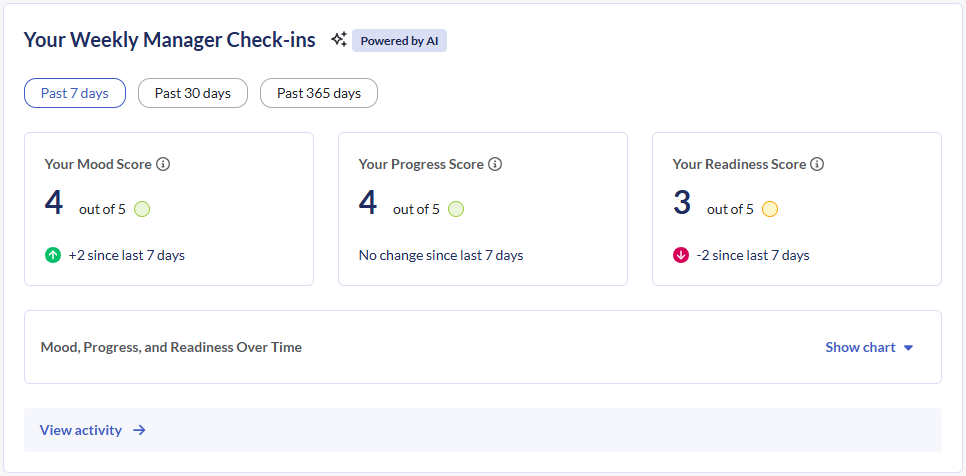
You certainly can! Click Home in the top menu and scroll down to Your Weekly Manager Check-ins. Click View activity.
Where is my data stored?
Data is stored securely. Companies can run analytics on numerical insights at individual, team, and company levels.
Can my data be deleted?
Companies can request deletion of all check-ins data and we will comply. Individual-level deletion isn't currently available as data is incorporated into multiple reports and communication channels based on settings.
Can I delete my check-in history?
Individual check-ins cannot be deleted once submitted, as they're incorporated into reports and trends.
What happens if I skip a week?
You simply complete the next week. Consider marking yourself "on vacation" in user settings if you'll be out, so completion rates aren't affected.
Can I edit after submitting?
Currently no—responses are scored within 10 minutes of submission. A draft/save feature is coming soon.
Can I do check-ins on mobile?
Yes! The easiest method is using your phone's speech-to-text feature (tap the microphone icon on your keyboard). A dedicated mobile experience is coming later in 2026.
Will there be other ways to complete check-ins?
Yes! Starting Q2 2026, you'll be able to complete check-ins via email reply, Microsoft Teams, or Slack. Ask your Admin or CS contact if interested.
