Introduction to Interview Intelligence
 Updated
by
Amy Thomas
To help you evaluate candidates faster and with greater confidence, you can use Criteria AI to enhance your structured interviews. Interview Intelligence is a bundle of features that use AI to enhance Criteria's structured interviewing solutions. Whether you want Criteria AI to score your candidates' responses automatically, or simply to give you the tools to make evaluating your candidates faster and easier than ever, Interview Intelligence can help.
Interview Intelligence brings the same scientific rigour that sits behind our assessments to the scoring of your video interviews and AI Interviews. Everything stays in one place alongside your candidates' applications and assessment results.
What is Interview Intelligence?
Interview Intelligence includes five features:
✔️ Interview Transcription: AI is used to provide a clear and accurate text version of a candidate's responses in a video interview.
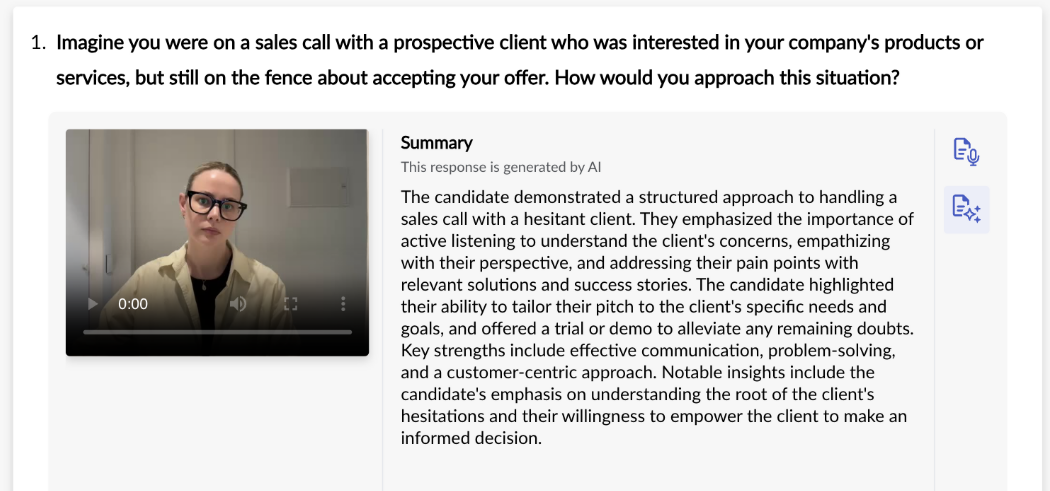
✔️ Interview Summarisation: AI is used to provide a quick, clear and factual overview of a video interview.
✔️ AI-assisted question creation: AI is used to screen the interview questions that you create. The AI model determines whether the category (behavioural, situational, experience-based) and quality (for example, work related and not illegal) of the question are suitable for being automatically evaluated and scored.
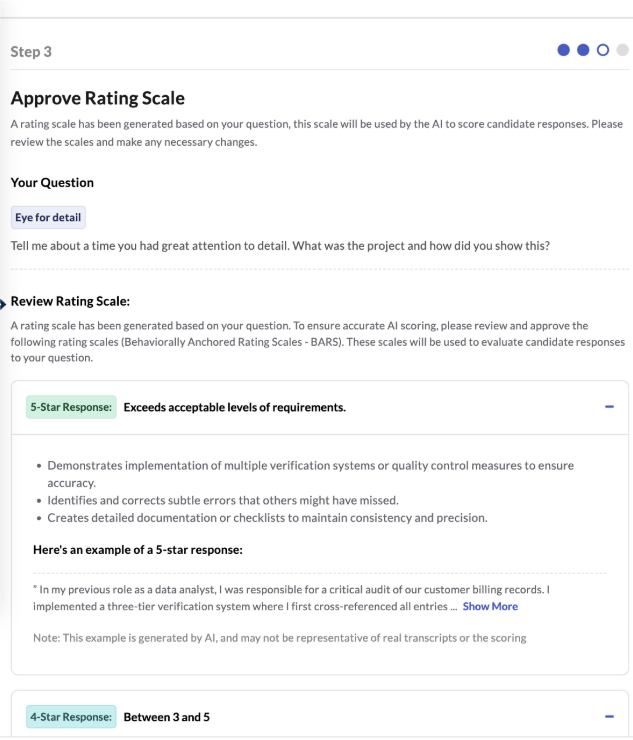
✔️ AI-generated evaluation guides: for each question, AI generates a behaviourally anchored rating scale (BARS), providing the rubric for evaluating the candidate's responses to the interview question.
✔️ Automated Scoring: the AI model takes the transcript from the interview and the BARS guide to determine the evaluation and score for that question.
Interview Intelligence has two main components: Transcripts and Summaries, which help your evaluators, and Automated Scoring, which evaluates the responses for you. You can use either or both.
Transcripts and summaries
With Interview Intelligence, a transcript of the candidate's response is generated automatically, giving you a clear and accurate text version of their answer so you don't miss any key details. An AI-generated summary of the response gives you a quick, clear and factual overview, making it faster and easier to evaluate your candidate with confidence.
- Turning it on: if this is enabled for your account, an Admin user can turn on transcripts and AI summaries for asynchronous video interviews in Company Preferences, under Async Interviewing - Transcripts & Summaries.
- Viewing them: when Interview Intelligence is enabled for your account, click the Transcript icon to read the text version of a candidate's response, or click the Summary button to view the AI summary. Both are available on the evaluation screen and on the Review Responses screen.
- What they are based on: the summary and automated scoring are based on the transcript, not on the recording itself.
- Human Scoring: when your team scores the interview, Criteria AI still generates a transcript and AI summary (if enabled) that your evaluators can review alongside the candidate's recording.
- Sharing: anyone with an approved email address who opens a View Responses link can see the recordings, transcript and summary, but cannot add ratings or comments.
Automated Scoring
Automated Scoring lets Criteria help you to:
✔️ Create questions that can be scored by our AI.
✔️ Generate a rating scale for each question automatically, and refine the rubric to suit your organisation's needs.
✔️ Score your video interviews automatically, with no manual evaluation required.
Create an Automated Scoring question
You create these questions in your Interview Content Library by selecting Automated as the scoring type. The process has four steps.
- Choose the competency. Select a pre-loaded competency or add your own. A competency you add is validated to make sure it is suitable for automatic scoring.
- Create the question. With a pre-loaded competency, you can select an example question or write your own. With a custom competency, you write your own. Click Validate and Criteria's AI will check that the question can be scored automatically. Questions must be behavioural, experience-based or situational (see below).
- Approve the response rating scale. With a pre-loaded competency and suggested question, the rating scale loads immediately. With your own question, the AI generates the scale, which can take up to a minute. You can click Edit Rating Scale to change the indicators the AI will score candidates on, then Validate and Save Changes.
- Record a video and adjust settings. Choose or create a category, record or upload a video of the question (optional), and set the preparation and answer times. The response type is always Video, because Criteria AI only evaluates video responses.
The three question types that can be scored automatically are:
- Behavioural: asks how a candidate has responded to situations in the past, focusing on actions and outcomes. For example: "Describe a time where you identified a risk or hazard in your work environment. What steps did you take to mitigate that risk?"
- Experience-based: asks about the candidate's past roles, responsibilities and achievements. For example: "Describe your experience working in sales for technology or software."
- Situational: a hypothetical question that assesses how a candidate would handle a challenge they may not have experienced. For example: "Imagine you had to evaluate someone else's work or project plan. What would you be looking for in this evaluation?"
Choose how each question is scored
You choose the scoring type for each question in your interview template, so your template can be completely human scored, completely AI scored, or a mix of both. Click Scoring Type next to each question to select how it will be evaluated.
- Human Scoring: your team evaluates the response manually. For example, "Why do you want to work here?"
- Automated Scoring: the response is scored automatically by Criteria's Interview Intelligence. This is best used for behavioural, situational and experience-based questions. For example, "Tell me about the most difficult problem you have needed to solve at work. What was your process in finding a solution?"
- Unscored: the question does not need to be scored. For example, "What is your salary expectation?"
A few rules apply to scoring types:
- Questions created with the Human Scoring type can only be set to Human or Unscored.
- Questions created with the Automated Scoring type can be changed to Human or Unscored in the template.
- Questions in the Stock Library cannot be scored automatically. They must be rated by an evaluator or set to Unscored.
- Automated Scoring is not available for live interviews.
- Automated Scoring does not currently work with Criteria Recommended Interview Templates. To use it, create a custom template.
Hybrid Scoring
Hybrid Scoring lets you mix scoring types within a single interview template, instead of choosing between a fully AI-scored and a fully human-scored interview. You can set the scoring type question by question, to suit your hiring goals, question style and team workflow.
- Get the speed of AI where it fits best. Use Automated Scoring on eligible behavioural, situational or experience-based questions to surface stronger matches quickly and keep your process moving.
- Keep human judgement where it matters most. Questions that call for context and nuance, such as motivation-style prompts, can stay human scored.
- Ask the questions you need, without forcing a score. Unscored questions, such as "Tell us about yourself", give you added insight without affecting a candidate's score.
- Build more complete, job-relevant interviews that feel more natural and combine structured evaluation with room for human interpretation.
Templates that contain a mix of scoring types are identified as Hybrid automatically, which makes them easy to organise and filter. AI scoring starts automatically on Automated questions after candidates complete the interview, while your evaluators review the human-scored and unscored responses in parallel.
Use Interview Intelligence in your jobs
When you add a video interview to a job, the screens you see depend on how the interview is scored.
- Automated Scoring: if you plan to have Interview Intelligence evaluate the interviews, no evaluators need to be selected, because the interview cannot also be manually scored.
- Hybrid Scoring: Human Scoring questions require human evaluation, so select evaluators or enable Evaluator Self-Assignment. Interview Intelligence scores all the Automated Scoring questions.
- Human Scoring: if all questions are human scored, assign evaluators or enable Evaluator Self-Assignment. Transcripts and summaries are still available if they are enabled.
Interview Intelligence does not contribute to the Number of Evaluations Required. This field only refers to the number of human evaluations required before scores are displayed. Interview Intelligence and self-assigned evaluators appear alongside pre-assigned evaluators in your evaluation results.
Evaluate and share results
When a candidate completes an automatically scored video interview, Interview Intelligence evaluates the responses against the response rating scales you approved for each question.
- Evaluation links: if the interview template uses Automated Scoring only, just the View Interview link is displayed and the Evaluate Interview link is not available. For Hybrid Scoring, evaluators see only the Human Scoring and Unscored questions on the Evaluate Interview screen. The Review Responses screen shows every question presented to the candidate, and is available to non-evaluator users and to evaluators once they have completed their evaluation.
- Viewing scores: on your Dashboard, See Scores is displayed next to a candidate who completed an automatically scored video interview. You can view the recordings, transcripts, AI summary and results, but you cannot add your own rating to the Score Report.
- Sharing: results for both manually evaluated and automatically scored video interviews can be shared with others.
- Reporting: the Interview Data Report indicates when Interview Intelligence was used to score the interview responses.
- Evaluators: guest evaluators do not receive automatic notifications, so share their evaluation links when candidates are ready for review.
Candidate experience
There is nothing in the invitation process or the system default invitation email to indicate that a video interview or AI Interview will be automatically scored. However, when candidates open their invitation, they are instructed to respond to the questions in English, and are advised that their responses will be assessed using AI tools to ensure objective and fair reviews. Interview Intelligence is currently available in English only.
Candidates enjoy the same simple, engaging interview experience. For video interviews and AI Interviews where they will respond verbally they will begin with a systems check and practice question. Your branded landing page can also support the use of automatically scored video and AI interviews.
Interview Intelligence and your other interviews
- Real Time Interviewing: the AI capabilities included with Real Time Interviewing are Insights, transcripts, summaries and Ask Anything. They can be enabled with Real Time Interviewing in Company Preferences, and are only available if the candidate consents.
- AI Interviews: AI Interview templates can be human scored, automatically scored by Interview Intelligence or Hybrid scored. Candidates' responses are stored as a recording and transcript.
- ATS integrations: transcripts and summaries are shown in the evaluator experience, which evaluators can reach using the evaluator link or the score report. They are not displayed in your ATS or included in the score report. Automated Scoring is available in all integrations that offer full Structured Interviewing support. The candidate's interview is scored in Criteria as soon as they complete it, your ATS may briefly show Evaluation In Progress, and the video interview score then appears as normal. Automated scoring does not generate a recommendation, so the recommendation field shows N/A.
Set up Interview Intelligence
- Add Interview Intelligence to your account. Contact your Customer Success Manager.
- Turn on transcripts and summaries. An Admin user enables them in Company Preferences.
- Create your questions. Create Automated Scoring questions for the questions you want Interview Intelligence to score.
- Create your interview template. Set a scoring type for each question to create an Automated, Human or Hybrid template.
- Create your job and select your template.
- Invite your candidates and review the results.
You can also explore Interview Intelligence in the Assessment Library: click Interview Intelligence under Additional Solutions to see an overview and process flow, and use Preview Results to view a sample interview score report.
